
· Goher K · Laravel & Backend · 18 min read
How to Build AI Agents with Laravel 13 AI SDK: 2027 Guide
Master autonomous AI agent development in Laravel 13 using the official AI SDK. Build multi-agent workflows, custom tools, human approvals, and MCP protocols.
How to Build Autonomous AI Agents with Laravel 13’s Official AI SDK
Fact-Checked & Tested by Goher K · Principal Solutions Architect & Technical Consultant with 20+ years evaluating distributed systems, web architecture, and cloud infrastructure.

Autonomous AI agents represent the most consequential evolution in modern backend engineering since the advent of distributed microservices. While earlier generations of AI integration relied on naive, one-shot prompt wrappers around external LLM APIs, enterprise software demands deterministic execution, structured data validation, persistent conversational memory, and strict human authorization boundaries.
With the release of Laravel 13 and the official first-party Laravel AI SDK (laravel/ai), the framework introduces a native, type-safe architecture for building, orchestrating, and testing production-grade autonomous agents. By bridging large language models directly into Laravel’s battle-tested primitives—Eloquent ORM, Queue workers, Event broadcasting, and Model Context Protocol (MCP)—the AI SDK transforms PHP from an observer into a premier environment for agentic software design.
This comprehensive guide details the architectural foundations, real-world implementations, multi-agent delegation patterns, and production security protocols required to build autonomous agents with Laravel 13.
1. The Autonomous Agent Paradigm Shift in Laravel 13
Direct Answer (Laravel AI SDK Definition): The Laravel AI SDK is the official first-party package providing a unified, expressive PHP interface to construct autonomous agents, execute function-calling tools, enforce human-in-the-loop approvals, and orchestrate multi-agent workflows across leading LLM providers (Anthropic Claude, OpenAI, Google Gemini, DeepSeek, Groq, Mistral, and local Ollama instances) without vendor lock-in.
Historically, PHP developers building intelligent features were forced to assemble fragmented community packages, handcraft JSON Schema strings, and manually manage HTTP curl timeouts. If a model failed to format a tool argument correctly, the entire transaction halted.
┌────────────────────────────────────────────────────────────────────────┐
│             LARAVEL 13 AI SDK AGENT EXECUTION ARCHITECTURE             │
├───────────────────────────────┬────────────────────────────────────────┤
│ Layer                         │ Engineering Functionality              │
├───────────────────────────────┼────────────────────────────────────────┤
│ Application Interface         │ Agent class encapsulation, system      │
│ (App\Ai\Agents)               │ instructions, and Promptable traits.   │
├───────────────────────────────┼────────────────────────────────────────┤
│ Structured Contracts          │ Strict schema validation via JsonSchema│
│ (HasStructuredOutput)         │ contract, eliminating raw string parsing.│
├───────────────────────────────┼────────────────────────────────────────┤
│ Dynamic Tool Bus              │ PHP classes (App\Ai\Tools), MCP tools, │
│ (HasTools & Approvable)       │ Deferred ToolSearch, and HITL gates.   │
├───────────────────────────────┼────────────────────────────────────────┤
│ Context & Memory Engine       │ Conversational threads, Eloquent state │
│ (RemembersConversations)      │ persistence, and sliding context windows.│
├───────────────────────────────┼────────────────────────────────────────┤
│ Multi-Provider Transport      │ Normalized HTTP client routing requests │
│ (config/ai.php)               │ to Claude, OpenAI, Gemini, or Ollama.  │
└───────────────────────────────┴────────────────────────────────────────┘
The Laravel AI SDK elevates agent construction to a first-class architectural layer. Instead of scattering raw prompts throughout controllers or console commands, an agent is encapsulated as a dedicated class containing instructions, schema definitions, tool registries, and state management.
2. Installation, Environment Configuration & Database Migrations
Setting up the Laravel AI SDK requires installing the first-party package via Composer, publishing its service configuration, and executing database migrations to scaffold conversational memory tables.
Step 1: Require the Package via Composer
Run the following command in your Laravel 13 root directory:
composer require laravel/aiStep 2: Publish the Configuration and Migration Files
Publish the package assets using Artisan:
php artisan vendor:publish --provider="Laravel\Ai\AiServiceProvider"This generates config/ai.php and migration files inside your database/migrations directory.
Step 3: Run Database Migrations
Execute the migrations to scaffold the tables that persist agent state and message history:
php artisan migrateThis creates two critical database tables:
agent_conversations: Tracks unique conversation IDs, associated users, assigned agents, and turn states.agent_conversation_messages: Stores ordered conversation turns, system prompts, assistant responses, tool calls, and execution payloads.
Step 4: Configure Provider Credentials
Define your provider credentials in config/ai.php or your .env file. The SDK supports zero-friction provider switching across cloud and self-hosted environments:
# Primary LLM Providers
ANTHROPIC_API_KEY=sk-ant-api03-...
OPENAI_API_KEY=sk-proj-...
GEMINI_API_KEY=AIzaSy...
GROQ_API_KEY=gsk_...
DEEPSEEK_API_KEY=sk-...

# Local & OpenAI-Compatible Inference Gateways
OLLAMA_API_KEY=ollama
LOCAL_AI_URL=http://127.0.0.1:11434/v1
LOCAL_AI_API_KEY=optional-bearer-token
To route requests through custom enterprise gateways or local inference endpoints (such as vLLM, LM Studio, or LiteLLM), define custom base URLs in config/ai.php:
'providers' => [
    'local' => [
        'driver' => 'openai-compatible',
        'url' => env('LOCAL_AI_URL', 'http://127.0.0.1:11434/v1'),
        'key' => env('LOCAL_AI_API_KEY'),
    ],
    'anthropic' => [
        'driver' => 'anthropic',
        'key' => env('ANTHROPIC_API_KEY'),
        'url' => env('ANTHROPIC_BASE_URL'),
    ],
],
3. Anatomy of an Agent: Instructions, Structured Outputs & Schema Validation
In the Laravel AI SDK, an agent is an object-oriented construct. You generate an agent using the Artisan CLI:
php artisan make:agent TechnicalAuditor --structuredThis creates the agent class inside app/Ai/Agents/TechnicalAuditor.php.
Implementing the Structured Agent Class
Enterprise systems require deterministic outputs. The HasStructuredOutput contract forces the model to return typed data validated against a strict JsonSchema:
namespace App\Ai\Agents;

use Illuminate\Contracts\JsonSchema\JsonSchema;
use Laravel\Ai\Contracts\Agent;
use Laravel\Ai\Contracts\HasStructuredOutput;
use Laravel\Ai\Promptable;
use Stringable;

class TechnicalAuditor implements Agent, HasStructuredOutput
{
    use Promptable;

    /**
     * Get the system instructions that govern agent behavior.
     */
    public function instructions(): Stringable|string
    {
        return <<<PROMPT
You are a Principal Cloud Infrastructure & Code Quality Auditor.
Analyze code snippets, architecture designs, and configuration files.
Identify security vulnerabilities, architectural bottlenecks, and performance issues.
Always output objective, quantifiable recommendations.
PROMPT;
    }

    /**
     * Define the strict JSON Schema for the structured output.
     */
    public function schema(JsonSchema $schema): array
    {
        return [
            'severity_score' => $schema->integer()->min(1)->max(10)->required()
                ->description('Overall risk score from 1 (benign) to 10 (critical breach).'),
            'status' => $schema->string()->enum(['compliant', 'warning', 'critical'])->required()
                ->description('Categorical operational compliance status.'),
            'findings' => $schema->array()->items(
                $schema->object([
                    'component' => $schema->string()->required(),
                    'vulnerability' => $schema->string()->required(),
                    'cve_reference' => $schema->string()->nullable(),
                    'remediation_steps' => $schema->string()->required(),
                ])
            )->required()->description('Exhaustive list of audited vulnerabilities.'),
            'estimated_remediation_hours' => $schema->number()->required()
                ->description('Estimated engineering time to resolve all findings.'),
        ];
    }
}
Prompting the Agent and Consuming Structured Data
Prompting the agent executes the generation step and returns an array typed to your schema:
use App\Ai\Agents\TechnicalAuditor;

$report = (new TechnicalAuditor)->prompt(
    'Audit this Nginx edge configuration for HTTP/3 and QUIC compliance: ...'
);

echo $report['severity_score']; // e.g. 7
echo $report['status'];         // "warning"

foreach ($report['findings'] as $finding) {
    Log::warning("Vulnerability in {$finding['component']}: {$finding['remediation_steps']}");
}
4. Tool Calling & Human-in-the-Loop (HITL) Tool Approvals
Autonomous agents achieve utility when they can act upon the outside world: querying databases, triggering webhooks, reading files, or executing system routines.
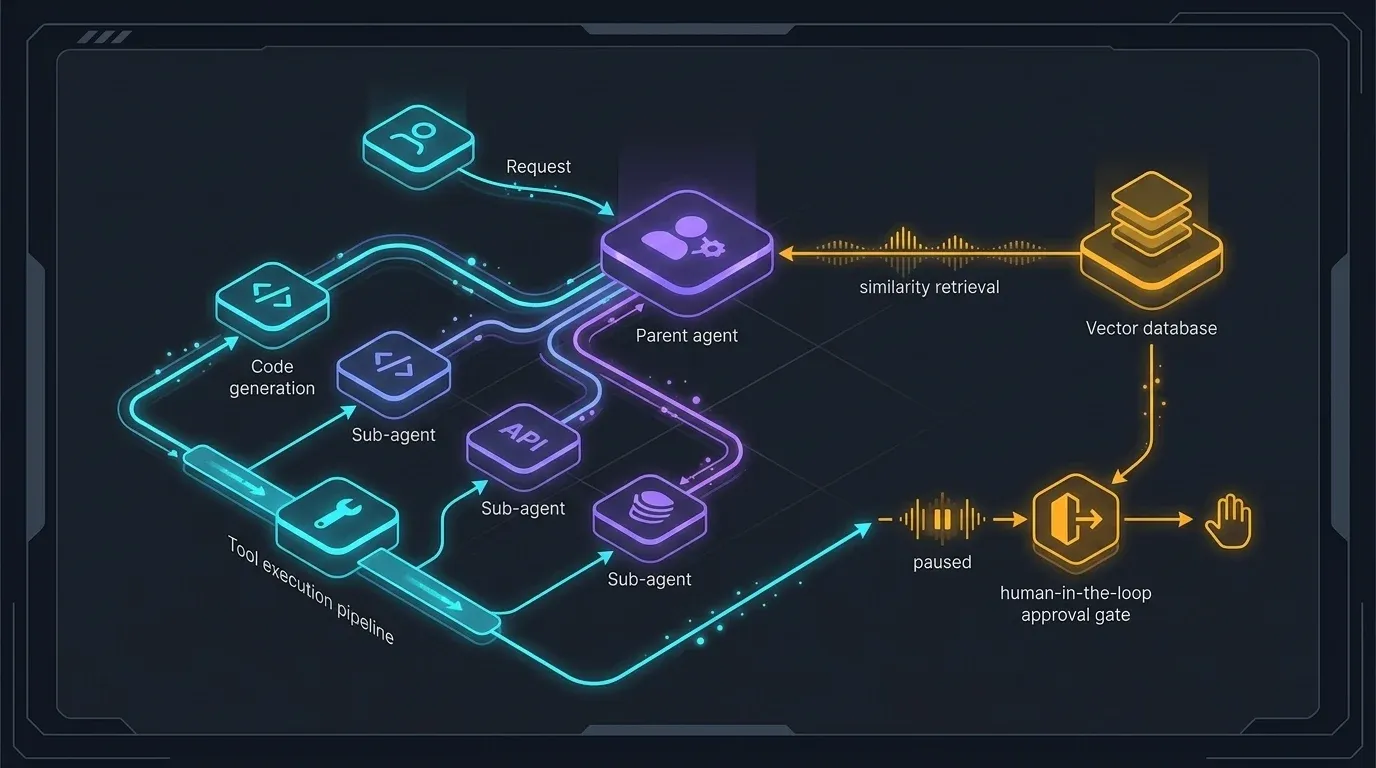
Visualizing the Agent Execution Lifecycle & Tool Pipeline
Step 1: Generate a Custom Tool
Generate a tool using Artisan:
php artisan make:tool FlushCdnCacheThe tool is scaffolded inside app/Ai/Tools/FlushCdnCache.php:
namespace App\Ai\Tools;

use Illuminate\Contracts\JsonSchema\JsonSchema;
use Illuminate\Support\Facades\Http;
use Laravel\Ai\Contracts\Tool;
use Laravel\Ai\Tools\Request;
use Stringable;

class FlushCdnCache implements Tool
{
    /**
     * Get the description of the tool for the model's function registry.
     */
    public function description(): Stringable|string
    {
        return 'Purges edge CDN cache tags or specific URLs across global edge nodes.';
    }

    /**
     * Define the parameters required by this tool.
     */
    public function schema(JsonSchema $schema): array
    {
        return [
            'zone_id' => $schema->string()->required()->description('The Cloudflare or Fastly Zone ID.'),
            'purge_tags' => $schema->array()->items($schema->string())->required()
                ->description('Array of cache-tags to immediately invalidate.'),
        ];
    }

    /**
     * Execute the tool logic upon agent invocation.
     */
    public function handle(Request $request): Stringable|string
    {
        $response = Http::withToken(config('services.cdn.token'))
            ->post("https://api.cdn-provider.com/v1/zones/{$request['zone_id']}/purge", [
                'tags' => $request['purge_tags'],
            ]);

        if ($response->successful()) {
            return "Successfully purged tags: " . implode(', ', $request['purge_tags']);
        }

        return "CDN purge failed with HTTP status: " . $response->status();
    }
}
Step 2: Enforcing Human-in-the-Loop (HITL) Approvals
When an agent tool performs destructive, financial, or irreversible actions (such as dropping database partitions, issuing payments, or deleting storage objects), automated execution poses unacceptable security risks.
The Laravel AI SDK solves this with the Approvable contract and InteractsWithApprovals trait. When an agent calls an approvable tool, execution automatically pauses, storing the pending tool call in the database conversation turn until an authorized user grants permission.
namespace App\Ai\Tools;

use Illuminate\Contracts\JsonSchema\JsonSchema;
use Illuminate\Support\Facades\Storage;
use Laravel\Ai\Concerns\InteractsWithApprovals;
use Laravel\Ai\Contracts\Approvable;
use Laravel\Ai\Contracts\Tool;
use Laravel\Ai\Tools\Request;
use Stringable;

class DeleteStoragePartition implements Approvable, Tool
{
    use InteractsWithApprovals;

    public function description(): Stringable|string
    {
        return 'Permanently deletes a directory partition from production cloud storage.';
    }

    public function schema(JsonSchema $schema): array
    {
        return [
            'disk' => $schema->string()->required()->description('The target storage disk (s3, gcs).'),
            'directory_path' => $schema->string()->required()->description('The exact path to purge.'),
        ];
    }

    public function handle(Request $request): Stringable|string
    {
        Storage::disk($request['disk'])->deleteDirectory($request['directory_path']);

        return "Partition [{$request['directory_path']}] on disk [{$request['disk']}] was deleted.";
    }
}
Step 3: Handling Paused Turns and Resuming Execution
In your controller or API route, you inspect if the agent is awaiting approval and return the pending decisions to your frontend UI:
use App\Ai\Agents\DevOpsSupervisor;
use Illuminate\Http\Request;
use Illuminate\Support\Facades\Gate;
use Illuminate\Support\Facades\Route;
use Illuminate\Validation\Rule;
use Laravel\Ai\Approvals\Decision;
use Laravel\Ai\Approvals\Decisions;
use Laravel\Ai\Models\Conversation;

Route::post('/api/agent/chat/{conversation}', function (Request $request, Conversation $conversation) {
    Gate::authorize('interact', $conversation);

    $validated = $request->validate([
        'message' => ['nullable', 'string', 'required_without:decisions', 'prohibits:decisions'],
        'decisions' => ['nullable', 'array', 'required_without:message', 'prohibits:message'],
        'decisions.*.action' => ['required_with:decisions', Rule::in(['approve', 'reject'])],
        'decisions.*.result' => ['nullable', 'string'],
    ]);

    // Format human approval decisions or standard prompt
    $prompt = isset($validated['decisions'])
        ? Decisions::from(collect($validated['decisions'])->map(
            fn (array $d) => match ($d['action']) {
                'approve' => Decision::approve(),
                'reject' => Decision::reject($d['result'] ?? 'Operation denied by administrator.'),
            }
        )->all())
        : $validated['message'];

    $response = (new DevOpsSupervisor)
        ->continue($conversation->id, as: $request->user())
        ->prompt($prompt);

    return response()->json([
        'conversation_id' => $response->conversationId,
        'status' => $response->hasPendingApprovals() ? 'awaiting_approval' : 'complete',
        'message' => $response->text,
        'approvals' => $response->pendingApprovals,
    ]);
})->middleware('auth:sanctum');
5. Multi-Agent Orchestration & Sub-Agent Delegation
Single-agent systems degrade as problem domains expand. Monolithic prompts loaded with hundreds of rules lead to instruction dilution and hallucinated tool calls.
The architectural solution is Sub-Agent Delegation. In Laravel 13, specialized agents implement the CanActAsTool contract, allowing parent orchestrators to delegate sub-tasks autonomously.
namespace App\Ai\Agents;

use Laravel\Ai\Attributes\Provider;
use Laravel\Ai\Contracts\Agent;
use Laravel\Ai\Contracts\CanActAsTool;
use Laravel\Ai\Contracts\HasTools;
use Laravel\Ai\Enums\Lab;
use Laravel\Ai\Promptable;

#[Provider(Lab::Anthropic)]
class SecuritySpecialistAgent implements Agent, CanActAsTool, HasTools
{
    use Promptable;

    public function instructions(): string
    {
        return <<<PROMPT
You are a dedicated Infosec Incident Specialist.
Evaluate firewall rule changes, SSH access requests, and credential rotation.
Authorize or decline security adjustments with strict compliance logs.
PROMPT;
    }

    public function tools(): iterable
    {
        return [
            new \App\Ai\Tools\InspectFirewallRules,
            new \App\Ai\Tools\RotateIamTokens,
        ];
    }
}
Now, the parent InfrastructureManager agent includes the sub-agent in its tools() method:
namespace App\Ai\Agents;

use Laravel\Ai\Contracts\Agent;
use Laravel\Ai\Contracts\HasTools;
use Laravel\Ai\Promptable;

class InfrastructureManager implements Agent, HasTools
{
    use Promptable;

    public function instructions(): string
    {
        return <<<PROMPT
You manage enterprise cloud operations.
For general queries, report infrastructure status.
Whenever a user requests security audits, IAM rotation, or firewall modifications,
delegate the task immediately to the SecuritySpecialistAgent.
PROMPT;
    }

    public function tools(): iterable
    {
        return [
            new \App\Ai\Tools\GetClusterMetrics,
            new SecuritySpecialistAgent, // Sub-agent acting as an intelligent tool
        ];
    }
}
When a user prompts the InfrastructureManager: “Rotate our production staging AWS keys”, the parent agent recognizes the specialized domain and invokes SecuritySpecialistAgent. The sub-agent executes with its own distinct prompt, model configuration, and isolated tools before returning its summarized result to the parent.
6. Dynamic Context: Agent Skills & Model Context Protocol (MCP)
Modularizing Domain Knowledge with Agent Skills
Loading huge procedural playbooks into global system instructions wastes context tokens. The HasSkills contract allows agents to load situational markdown guides dynamically using an internal LoadSkill tool.
resources/
└── skills/
    ├── devops-rollback/
    │   ├── SKILL.md
    │   └── rollback_matrix.json
    └── incident-response/
        └── SKILL.md
Inside the agent class:
namespace App\Ai\Agents;

use Laravel\Ai\Contracts\Agent;
use Laravel\Ai\Contracts\HasSkills;
use Laravel\Ai\Promptable;
use Laravel\Ai\Skills\Skill;

class SreOperationsAgent implements Agent, HasSkills
{
    use Promptable;

    public function instructions(): string
    {
        return 'You are an SRE on-call assistant. Maintain cluster stability.';
    }

    public function skills(): iterable
    {
        return [
            resource_path('skills'), // Scans directory for SKILL.md bundles
            new Skill(
                name: 'database-failover',
                description: 'Use when primary Aurora PostgreSQL database fails health checks.',
                instructions: view('skills.database-failover')
            ),
            fn () => $this->user->organization->skills->map(
                fn ($s) => new Skill($s->name, $s->description, $s->instructions)
            ),
        ];
    }
}
The agent only consumes tokens for database-failover when a failure is detected, maintaining lean token budgets during standard operations.
Connecting Model Context Protocol (MCP) Tools
The Model Context Protocol (MCP) is an open industry standard enabling LLMs to securely interface with local development environments, enterprise SaaS, and remote database servers.
The Laravel AI SDK integrates natively with Laravel MCP clients. You can spread MCP tools directly into your agent:
use Laravel\Ai\Contracts\Agent;
use Laravel\Ai\Contracts\HasTools;
use Laravel\Ai\Promptable;
use Laravel\Mcp\Client;
use Laravel\Mcp\Facades\Mcp;

class EngineeringLeadAgent implements Agent, HasTools
{
    use Promptable;

    public function instructions(): string
    {
        return 'You coordinate software delivery across GitHub and local development environments.';
    }

    public function tools(): iterable
    {
        return [
            // Connect to remote GitHub MCP Server
            ...Mcp::client('github')->tools(),

            // Connect to local Artisan MCP CLI server
            ...Client::local('php', ['artisan', 'mcp:start'])->tools(),

            // Standard Application Tool
            new \App\Ai\Tools\FlushCdnCache,
        ];
    }
}
Deferred Tool Loading via ToolSearch
When an agent possesses access to 50+ tools across diverse microservices, sending all tool schemas in every LLM request degrades reasoning accuracy and inflates API costs.
The Laravel AI SDK provides Deferred Tool Loading via ToolSearch:
use App\Ai\Tools\DeleteStoragePartition;
use App\Ai\Tools\FlushCdnCache;
use App\Ai\Tools\InspectFirewallRules;
use App\Ai\Tools\RotateIamTokens;
use Laravel\Ai\Providers\Tools\ToolSearch;

public function tools(): iterable
{
    return [
        new FlushCdnCache, // Always loaded
        new ToolSearch(
            tools: [
                new DeleteStoragePartition,
                new InspectFirewallRules,
                new RotateIamTokens,
            ],
            strategy: 'bm25' // 'bm25' or 'regex' search strategy
        ),
    ];
}
7. Enterprise Production: Streaming, Middleware, Queuing & Testing
Deploying autonomous agents in mission-critical environments demands high resilience, audit logging, background execution, and comprehensive test coverage.
Agent Middleware
Just like HTTP middleware, agent middleware intercepts each generation step before it reaches the model provider:
php artisan make:agent-middleware AuditAgentDecisionsnamespace App\Ai\Middleware;
use Closure;
use Illuminate\Support\Facades\Log;
class AuditAgentDecisions
{
public function handle($prompt, Closure $next)
{
Log::info('Agent Generation Step Initiated', [
'prompt_length' => strlen((string) $prompt),
'timestamp' => now()->toIso8601String(),
]);
$response = $next($prompt);
Log::info('Agent Generation Step Completed', [
'usage' => $response->usage ?? null,
]);
return $response;
}
}To bind middleware to your agent, implement HasMiddleware:
use Laravel\Ai\Contracts\HasMiddleware;

class SreOperationsAgent implements Agent, HasMiddleware
{
    public function middleware(): array
    {
        return [
            new \App\Ai\Middleware\AuditAgentDecisions,
        ];
    }
}
Asynchronous Queueing
For computationally intensive workflows that analyze megabytes of log files or generate complex reports, queue the agent using Laravel’s queue workers:
use App\Ai\Agents\TechnicalAuditor;

(new TechnicalAuditor)
    ->queue('Audit all 10,000 server access logs from today.')
    ->then(function ($response) {
        // Dispatched asynchronously when complete
        Notification::send(User::admins(), new AuditCompletedNotification($response));
    });
Comprehensive Unit & Integration Testing
Testing agents without incurring massive API billing or suffering brittle network failures is simple with Agent::fake():
namespace Tests\Feature;

use App\Ai\Agents\TechnicalAuditor;
use Illuminate\Foundation\Testing\RefreshDatabase;
use Laravel\Ai\Prompts\AgentPrompt;
use Tests\TestCase;

class TechnicalAuditorTest extends TestCase
{
    use RefreshDatabase;

    public function test_agent_generates_valid_audit_report(): void
    {
        // 1. Mock structured output response
        TechnicalAuditor::fake([
            [
                'severity_score' => 8,
                'status' => 'critical',
                'findings' => [
                    [
                        'component' => 'Nginx Edge',
                        'vulnerability' => 'Missing TLS 1.3 Strict Ciphers',
                        'cve_reference' => null,
                        'remediation_steps' => 'Update ssl_protocols in nginx.conf.',
                    ],
                ],
                'estimated_remediation_hours' => 3.5,
            ],
        ])->preventStrayPrompts();

        // 2. Execute code under test
        $response = (new TechnicalAuditor)->prompt('Review edge security');

        // 3. Make assertions
        $this->assertEquals(8, $response['severity_score']);
        $this->assertEquals('critical', $response['status']);

        // 4. Assert model received correct prompt
        TechnicalAuditor::assertPrompted(function (AgentPrompt $prompt) {
            return str_contains($prompt->text, 'Review edge security');
        });
    }
}
8. Frequently Asked Questions
What is the Laravel AI SDK and how does it integrate with Laravel 13?
The Laravel AI SDK (laravel/ai) is the official first-party package providing an expressive, unified PHP API to build AI-native applications and autonomous agents in Laravel 13. It abstracts multi-provider LLM integrations (OpenAI, Anthropic Claude, Google Gemini, Ollama, DeepSeek) while deeply integrating with core Laravel primitives like Eloquent, Queues, Events, Cache, and Model Context Protocol (MCP).
How do you generate an agent class in Laravel 13?
You generate an agent using the Artisan CLI command 'php artisan make:agent AgentName --structured'. This generates a class in the app/Ai/Agents directory implementing Laravel\Ai\Contracts\Agent and HasStructuredOutput, using the Promptable trait.
How does tool calling work within Laravel AI SDK agents?
Tools provide agents with execution capabilities. You create tools via 'php artisan make:tool ToolName', which generates a class implementing Laravel\Ai\Contracts\Tool. The class defines a description(), a JSON Schema definition via schema(JsonSchema $schema), and a handle(Request $request) method that executes application code when invoked by the LLM.
What is Human-in-the-Loop (HITL) tool approval in Laravel 13?
HITL allows developers to pause agent execution before executing destructive or sensitive tools (such as database writes, refunds, or file deletions). By implementing the Approvable contract and InteractsWithApprovals trait, the agent pauses its turn in the conversation state until an authenticated administrator submits an explicit approve or reject decision.
How do sub-agents work in Laravel 13 multi-agent architectures?
Sub-agents allow parent agents to delegate specialized tasks. A sub-agent implements Laravel\Ai\Contracts\CanActAsTool alongside Agent. When registered in a parent agent's tools() method, the LLM autonomously recognizes when to route complex domain inquiries (e.g., billing, fraud, technical support) to the specialized sub-agent.
What is the difference between Agent Skills and System Instructions?
System instructions provide static, global operational rules loaded on every agent invocation. Skills (via HasSkills) modularize situational knowledge into separate markdown files (e.g., SKILL.md in resources/skills/) or database records. The SDK injects a LoadSkill tool that retrieves full skill instructions only when contextually triggered, saving token costs.
How does the Laravel AI SDK connect to Model Context Protocol (MCP) servers?
Laravel AI SDK integrates with the official Laravel MCP client. In an agent's tools() method, developers can spread external tools directly from remote or local MCP servers using '...Client::web("https://mcp.example.com")->withToken($token)->tools()' or named clients via '...Mcp::client("github")->tools()'.
What is Deferred Tool Loading in the Laravel AI SDK?
Deferred Tool Loading wraps large collections of tools inside a ToolSearch provider tool (e.g., new ToolSearch(tools: [...], strategy: 'bm25')). Rather than sending dozens of tool definitions on every API request—which bloats token costs and causes hallucination—the provider dynamically retrieves only the relevant tools when triggered by user intent.
How do you test Laravel AI agents without consuming API credits?
The SDK provides robust testing fakes via AgentClass::fake([...]). You can mock structured outputs, assert prompts received with AgentClass::assertPrompted(), assert queued prompts, verify approval continuations, and enforce preventStrayPrompts() to prevent unexpected outbound LLM API requests.
How can agents stream responses to frontend applications like Livewire?
The SDK natively supports token streaming via server-sent events (SSE) or WebSockets. Calling ->stream($prompt) returns a streamable response that seamlessly binds to Livewire components or broadcasts events across Laravel Reverb and Echo, rendering tokens in real-time.
9. Architect Enterprise Agentic Systems With Principal Engineers
Building production-ready autonomous agents requires systems-level architecture spanning database locking, queue concurrency, rate limiting, and defensive validation. Whether engineering multi-agent ecosystems with Laravel Backend Development, designing high-concurrency Modern Web Development, or auditing enterprise systems for Technical Performance & Security, our engineering advisory delivers resilient, fault-tolerant solutions.